


Tracking Billable Hours From Claude Code, Codex, Cursor, and ChatGPT With Remote MCP
Summary: How remote MCP servers let developers and consultants log billable hours directly from Claude Code, Codex, Cursor, and ChatGPT—comparing popular MCP-enabled time trackers and the OAuth 2.1 permission boundaries that keep billing data safe.
If you bill clients by the hour as a developer or consultant, your worst revenue leak is not your hourly rate—it is context switching. You spend 90 minutes debugging a production migration in Claude Code, Codex, or Cursor, jump straight into a pull request review, and forget to log half of it until Friday afternoon.
Passive trackers like WakaTime or ActivityWatch capture editor, app, or browser focus automatically (ActivityWatch also documents an optional Teams call watcher, and WakaTime can generate PDF invoices from tracked coding hours), but passive window telemetry still has to be turned into explicit client, project, task, billable-status, and receivables records. Connecting your time tracker directly to your AI tools over the Model Context Protocol (MCP) lets you log deliberate, billable entries without leaving your terminal or editor.
I recently shipped a stateless remote MCP server for Hourbun (my flat-rate time tracking and invoicing app) and audited how popular time trackers handle AI integrations as of November 2026. Here is how the workflow runs day to day, how selected MCP-enabled trackers compare, and the permission boundaries to check before granting an AI assistant write access to billing data.
How the Workflow Works in Claude Code, Codex, Cursor, and ChatGPT
Once connected to a remote MCP server, your AI assistant or coding agent turns short natural-language prompts into structured timers and time entries that land directly in your regular timesheet—with client, project, task, and hourly rate already resolved.
In a typical consulting day, four prompts cover most time management:
- Starting work: "Start my timer on Acme Robotics — Checkout redesign development."
- Logging focused blocks: "Log 1.5 hours on Checkout redesign code review today with the note: reviewed Stripe webhook retry logic."
- Mid-week checks: "Show my tracked hours this week by project."
- Pre-invoicing review (owner/admin role): "What billable time hasn't been invoiced yet this month, and which invoices are overdue?"
Everything logged over MCP writes to the same weekly timesheet grid as manual entries, so there is nothing extra to reconcile before invoicing.
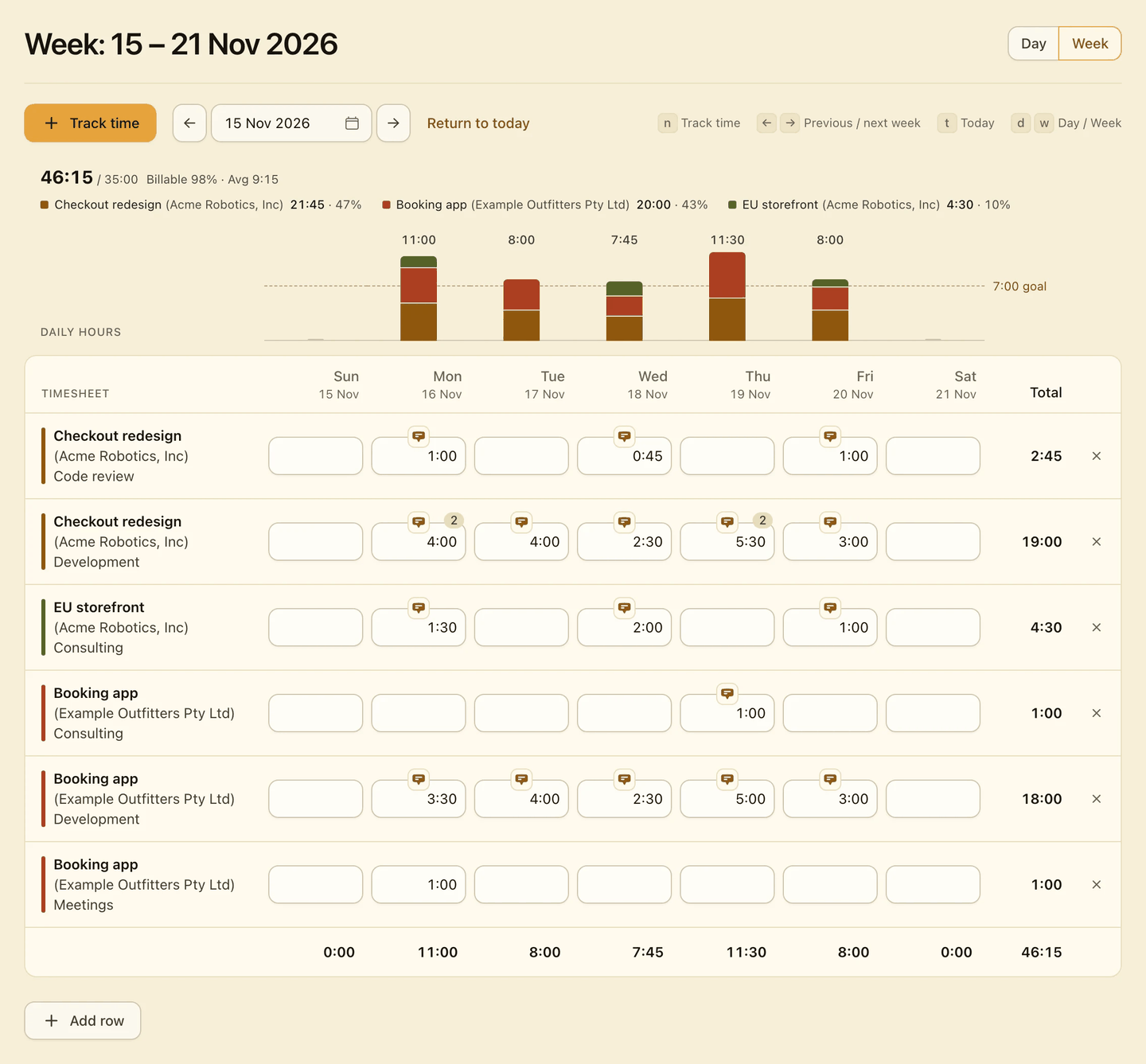
Time logged from an AI assistant or coding agent lands directly in the normal weekly timesheet grid (shown in Hourbun), ready for review and invoicing.
Connecting Chat Assistants vs. Terminal & Editor Agents
MCP clients connect in two main ways:
- OAuth 2.1 clients (no API token required): Chat and desktop connectors—Claude (web, desktop, and mobile via custom connectors or the Claude Connectors Directory), Perplexity, Mistral Le Chat, Raycast, and ChatGPT (where custom remote MCP is enabled by account and workspace policy)—take just the remote server URL (
https://hourbun.com/api/v1/mcpfor Hourbun) in their connector settings. Editors such as Cursor and VS Code (with GitHub Copilot) trigger the same OAuth flow from a tokenless entry (omitting auth headers) in~/.cursor/mcp.jsonor.vscode/mcp.json(and Claude Code also supports OAuth login directly). - Bearer-token CLI and editor agents: Terminal and editor tools such as Claude Code, Gemini CLI, OpenCode, Zed, Cline, and Roo Code support Streamable HTTP with an
Authorization: Bearerheader in their config or CLI command. For Codex, Hourbun's documented setup passes a personal token via--bearer-token-env-var HOURBUN_TOKEN(current Codex releases also support OAuth viacodex mcp login).
See Hourbun's guide to tracking time with ChatGPT and Claude for the ChatGPT and Claude walkthrough (with links to dedicated editor and CLI pages), and the Hourbun API & MCP reference for the full client-by-client setup configs and OpenAPI/endpoint schema.
Comparing Selected Time Tracking Apps With MCP Support
Many time trackers now publish remote MCP servers—including Everhour, Harvest, Hourbun, Toggl (the flagship app launched in September 2026, separate from legacy Toggl Track), TimeCamp, Teamwork.com, Avaza, Harpoon, and Bonsai (in beta)—while FreshBooks and Hubstaff offer read-only connectors and Clockify documents an API-key MCP setup with an unclear rollout (its setup guide still says "coming soon").
The table below compares seven widely evaluated trackers checked in November 2026:
| App | MCP Access | Documented Scope | Built-In Client Invoicing |
|---|---|---|---|
| Clockify | Unclear rollout | API-key setup documented; help docs still say "coming soon" | Yes (from Standard) |
| Everhour | Read & write | Timers, time entries, timesheets, reports (all plans incl. Free) | Yes (Team plan) |
| FreshBooks | Read-only | Read-only connectors for Claude and ChatGPT | Yes |
| Harvest | Read & write | Examples: reads/writes time & expenses, edits clients/projects/tasks/billing rates, reads invoices & creates drafts (no sending) | Yes |
| Hourbun | Read & write | 23 tools: 15 read-only (incl. invoices/uninvoiced for admins), 8 time/timer writes | Yes (all plans) |
| Hubstaff | Read-only | Read-only remote MCP server | Yes |
| Toggl (flagship) | Read & write | Remote MCP on every plan incl. Free (time, projects, and tasks) | No (exports time only) |
Selected examples checked November 2026 from vendor documentation (not an exhaustive directory; platforms such as TimeCamp, Teamwork.com, Avaza, Harpoon, and Bonsai beta also publish read/write MCP servers). Custom remote MCP access in ChatGPT depends on account and workspace policy.
The practical divide is whether your tracker also owns invoicing and what its write tools can touch. If you invoice elsewhere, flagship Toggl or Everhour's MCP servers cover time logging cleanly. If you want to ask "What billable work haven't I invoiced this month?" from the same assistant that runs your timer—without letting the model send emails or touch invoices—check both the read scope and the write ceiling.
How to Keep an AI Time-Tracking Server Safe
Giving an LLM write access to business records is practical only when the server enforces hard protocol boundaries: OAuth 2.1 scoped consent, workspace role checks inside the domain layer, zero money-moving write tools, and explicit destructive-action hints.
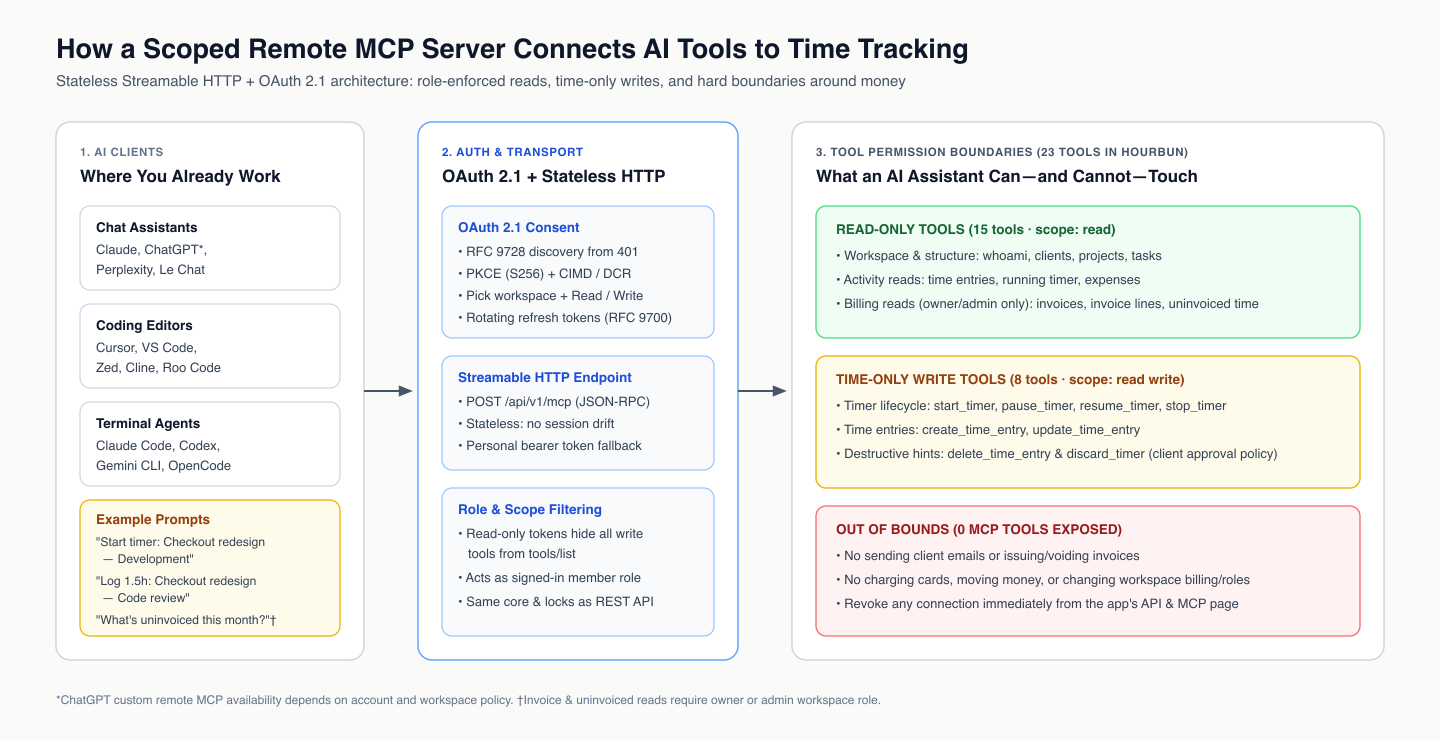
How Hourbun structures its remote MCP server: OAuth 2.1 scoped consent over stateless Streamable HTTP, enforcing workspace roles and separating read-only billing queries from time-only writes.
When implementing Hourbun's MCP server (com.hourbun/hourbun in the official MCP Registry and verified on Glama), five design rules mattered most:
1. Stateless Streamable HTTP backed by the exact same core as the REST API
Every MCP call hits POST /api/v1/mcp as a single stateless JSON-RPC request and routes straight into the same domain functions, database locks, and money calculations used by the web UI and REST API. There is no long-lived MCP session state to drift out of sync, and no parallel code path where an AI tool could bypass a locked invoice or an approved timesheet week.
2. OAuth 2.1 with automatic discovery and rotating refresh tokens
Using OAuth 2.1 with RFC 9728 protected-resource discovery, an OAuth client discovers authorization metadata from a 401 challenge, registers via Client ID Metadata Documents or Dynamic Client Registration, and authenticates with PKCE (S256 only—no shared client secrets). Access tokens expire in 1 hour, refresh tokens rotate on every use, and replaying an already-used refresh token immediately revokes the connection per RFC 9700.
3. Separate read vs. read write scopes—enforced at tools/list
During consent, you pick the workspace and choose either Read or Read and write. A read-only token does not merely fail if the model tries to call a write tool—the server omits write tools from tools/list altogether, so the assistant never sees them.
4. Workspace roles still apply to every tool
An AI connection acts strictly as the signed-in teammate. A regular team member can track their own hours and inspect assigned projects, while financial reads (list_invoices, get_invoice, get_uninvoiced) remain restricted to workspace owners and admins—both hidden from tools/list and enforced inside the domain core.
5. Hard boundary around emails, invoices, and money
None of Hourbun's 23 MCP tools (15 read-only, 8 write) can send a client email, issue an invoice, charge a card, or modify workspace roles. Writes stop at timers (start_timer, pause_timer, resume_timer, stop_timer, discard_timer) and time entries (create_time_entry, update_time_entry, delete_time_entry). The two irreversible tools—delete_time_entry and discard_timer—carry MCP's destructiveHint annotation; whether an assistant prompts before executing depends on your client's approval mode and tool settings (for example, in Claude, use Manual mode with Needs approval, or Always ask where available, since Auto mode or Always allow can let tools run without pausing for confirmation).
When MCP Time Tracking Fits—And When Passive Trackers Still Win
MCP time tracking works best when you want deliberate, client-billable entries without leaving your editor or chat workflow, while passive activity trackers still win for hands-free coding telemetry.
- Choose an MCP-enabled time tracker if you bill clients across both coding and non-coding work, live inside Claude Code, Codex, Cursor, or ChatGPT all day, and want tracked entries to feed invoices and uninvoiced reports directly. (Hourbun includes MCP, REST API, and webhooks on every plan—flat $15/month Duo up to 2 seats, $99/month Team up to 30 seats, 14-day free trial, no free plan.)
- Choose a passive tracker (WakaTime or ActivityWatch) if you want automatic per-file and per-branch coding telemetry with zero prompting (WakaTime can also generate simple PDF invoices from tracked coding hours, though it does not replace a full project/task timesheet, expense, and receivables workflow).
- Audit each connector's write scope before enabling write access: For example, Harvest's MCP covers time entries, expenses, project/client/task and billing-rate edits, and draft invoice creation (without emailing invoices); flagship Toggl covers time, projects, and tasks; Everhour covers timers, timesheets, and reports; and FreshBooks and Hubstaff stay read-only.
Frequently Asked Questions
How do I track billable hours from Claude Code, Codex, or Cursor?
Connect a time tracker that exposes a remote MCP server over Streamable HTTP. OAuth-capable editors like Cursor and VS Code trigger OAuth from a tokenless entry (omitting auth headers) in mcp.json (and Claude Code supports OAuth directly), while token-based CLI and editor setups take the server URL plus a personal bearer token (as an Authorization header, or for Hourbun's documented Codex setup via --bearer-token-env-var). Once connected, plain-English prompts start timers and log billable entries directly to client projects.
Which time tracking apps work with Claude or ChatGPT via MCP?
Among popular trackers checked in November 2026, Everhour, Harvest, Hourbun (listed in the official MCP Registry and the Claude Connectors Directory), and flagship Toggl (separate from legacy Toggl Track) offer read-and-write remote MCP servers—alongside other platforms such as TimeCamp, Teamwork.com, Avaza, Harpoon, and Bonsai (beta)—while FreshBooks and Hubstaff offer read-only connectors. In Claude, you can add a remote MCP server directly as a connector; in ChatGPT, custom remote MCP access depends on your account and workspace policy.
Is it safe to give an AI assistant write access to my time tracker?
It is safe when the server enforces OAuth scoped consent, role-based access control, and tight write boundaries. Look for a server that separates Read from Read and write, enforces your workspace role on financial reads, exposes no tools that email clients or move money, flags delete/discard calls with MCP destructiveHint annotations, and lets you revoke individual connections immediately. On the client side, configure your AI app to require manual confirmation before destructive tools run (such as Manual mode with Needs approval, or Always ask where available, rather than Auto or Always allow).
How is MCP time tracking different from WakaTime or ActivityWatch?
WakaTime and ActivityWatch passively log editor, app, or browser focus (ActivityWatch even offers an optional Teams call watcher, and WakaTime can export PDF invoices from coding hours)—great for hands-free telemetry, but passive signals still do not maintain deliberate client/project/task assignments, billable-status rules, expenses, or receivables follow-ups. MCP time tracking records deliberate project-and-task entries directly into your billing workspace on command and, on invoicing-enabled trackers, lets you query uninvoiced work or overdue invoices in the same conversation.
I'm Fred Wu, a Melbourne-based software engineer and the maker of Persumi and Hourbun, one of the MCP-enabled time trackers discussed above.
Enjoy what you are reading? Sign up for a better experience on Persumi.

